
Building AI-Augmented Administrative Operations - Court Reporting, Transcription, & Expert Reports
As AI becomes integral to court reporting and transcription workflows, organizations must rethink how they recruit, train, and manage their teams. This session explores practical strategies for integrating automation while preserving human expertise through knowledge transfer and continuous learning. Attendees will gain insight into building sustainable, AI-augmented operations that enhance efficiency, accuracy, and professional growth.

S1- Hello everyone. Sorry we are 25 minutes late for this next session. This is I'm going to try and keep it short and sweet so that we can get back on schedule. I'll spend 20 minutes or so talking about actually what it means to build an AI augmented operation specifically with a focus on court reporting and transcription. So what does it mean? I mean, in the last session, we spoke about what it's like for the reporter and the transcriptionist. But as business owners, what does it mean for you to actually manage a team that is now doing multiple different forms of capture and having to figure out you know, who's the guardian of the record, who is producing the transcript, who's responsible for billing all of that, like all the different steps. And I guess the biggest question there is really just because you had a steno operation, can you really use the same process? And that's the first thing we're going to talk about is can you use the same process to then do a digital operation where it's like digital reporting and digital transcription, or is there a process where you can do both? Because in the last session, we spent quite a bit of time talking about the fact that irrespective of how the how the capture is done, that the new normal will be producing the most accurate record. Right. And so let's talk about that. Today is like the big difference is now while if you in the past if you had a steno or even now if you have steno, they usually are responsible for capturing the record for doing their scoping, their proofing. They'd hire their scopist or proofer and bill you as the company for the finished transcript. They they'll give you back the audio. They'll usually use their own tools. So from a lice tools licensing perspective, they purchase their tools. They're responsible for the licensing of their tools. And you're not really responsible for that. You're really paying them to produce a transcript and that's it in digital beyond the scheduling, which, you know, your admin is somebody in your team is probably going to schedule things. Capture is done by one person. So there's a digital reporter or a monitor or a court clerk. Somebody is doing capture. There's transcription, there's review, there's release and billing. And beyond that, who is also managing the licensing of the tools that do all of this. Right. That's one thing that you have to think about is who is responsible for purchasing those licenses. Especially given the fact that there's so many different people touching the record. Beyond that, Are there specific tools you want them to use? Right. Are you going to mandate that they use case CAD or they use eclipse or they use Microsoft Word or do you not care in the end if you only care about the transcript? How do you make sure that it's all covered? We then go to the next topic and sorry, I'm going through this a bit quickly. I'm just trying to get us back on track. But recruitment skills. I brought this up earlier. And we talked about it. Sue and Kim and Lori in the last session is similar to a stenographer where, you know, you had to be careful about the grammar and the accuracy of the record and all of that. You've got to actually worry about the grammar accuracy, right? You have to think about. If a speech system. So if an ASR is producing a transcript and it's whether it's 95%, 90%, 98 or 99% accurate, the things that the speech engine can't get are probably the same things that a junior transcriptionist cannot get. No offence. We're seeing this in reality, right? There are nuances in the in the words. There's there are homonyms. I cannot tell you how many times we've seen situations where the ASR will mix up. It's it's and it apostrophe s the three forms of there. And those are really the types of things that we're seeing that junior Transcriptionists have difficulty with. So the skills required to actually edit or proof a document are very, very different from the skills required to type from scratch. So that's something that we need to be aware of. I'm just keeping an eye on the chat as well. Yep. And PC comfort. I often say that if you've been typing from scratch as a digital transcriptionist, you're probably using Microsoft Word or whatever tool. It is similar to how you use the typewriter. Editing is very, very different. To be efficient as an editor or a proofer. You need to get comfortable with the hotkeys. You need to actually be able to navigate the transcript with the hotkeys, not move with your mouse because you will miss things. Valentina Bianco from our team had a workshop earlier where she went over how a transcriptionist transitions from typing to proofing and some of the things that she covers in that workshop are around learning to use your keyboard instead of your mouse while you're reviewing the transcript, because if you're just if you're glancing over words, you might actually miss the mistakes. Things that a speech engine makes mistakes on quite often are punctuation, context. Speaker Diarization now, it doesn't make those mistakes all the time, but when it does, you have to make sure that your reviewers are skilled enough to pick it up so that attention to detail, it has to be at an elevated level. Information security. Before lunch we had a session that covered cyber security. And that's one of the things that comes up is data sovereignty. You need to make sure you're aware of who has access in what country to your data, who's using it to actually train the system. So when you are running a a firm in today's date watching where the data is going, knowing what is happening with it, who has access to it, and even if you have people that are handling your files right, if you are if you're an operations leader in a court reporting or a transcription firm and you're emailing files around or sharing them on Google Drive or whatever, you need to make sure that they're being done in a secure manner. And the people working for you in that operation, whether they're employees or contractors, are aware of their obligations because at the end of the day, you are the guardian of that record. So ensure that all of the infrastructure that is handling your data is actually done well. Knowledge management as you have multiple people touching the record. Right. You've got somebody doing the capture. You've got somebody doing the review, audit release, whatever it is. You need a mechanism to share information. It is not a good idea for you to be communicating that verbally. Have typing guides in place, have training guide training videos in place, whatever it is, but use an intranet type portal to share that information with your staff, whether they're contractors or employees. Same thing you can use, WordPress as a system. It's similar to like an internal Wikipedia almost, but use something to actually share that information with people instead of PDF files flying around. Because what then happens is if you've got a revision to your typing guides or your policies and somebody has an old file that their version of the file they're working on, then the consistency across your process actually changes. So put in the time to try and create almost like an internal wiki intranet system so that you can you know, share that information in its in its most recent form with everybody consistently. And this actually doesn't take a lot of expense. Yes. There's a little bit of effort to set it up. But you can sign up for a WordPress account with most hosting companies and you can, you know, work with somebody in your in your IT team to get that set up. And the work really involved is around entering your data the first time and then, you know, once a month. Making sure that it's refreshed as needed. That's pretty much what I wanted to cover. Apologies that I'm rushing through it. I can answer any questions you might have at this point. Anything from the audience? All right, so we will finish this session, wrap it up at this point and then rejoin in a bit. I'm going to stop sharing my screen. We will rejoin in a bit. I believe our next session is at 5:00. So we'll take a bit of a short break and we will join in 25 or so minutes for our next session, which is around pioneering the digital firm where we'll have Sue and Brandon who head up Remote Legal, join us and talk about their experience building a fully remote firm. Thank you.

Meet the speaker
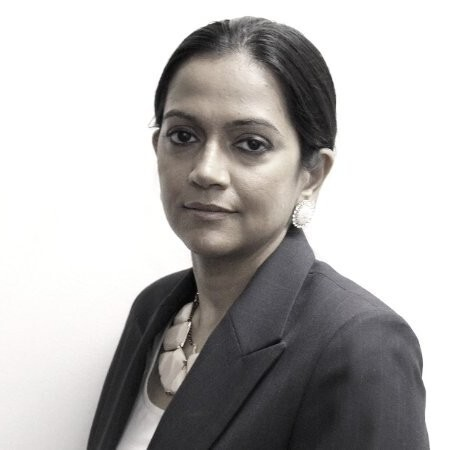
Mona Datt
CEO at Loom Analytics
With an engineering background and over 18 years of experience in legal and insurance operations, Mona Datt founded Loom Analytics to transform court reporting and transcription workflows through intelligent automation. She specializes in streamlining transcription processes for legal firms, public safety agencies, and insurance claims departments, combining technical innovation with deep industry expertise. Having partnered with hundreds of clients across these industries, Mona guides teams through digital transformation with a human-centric approach, ensuring automation tools integrate seamlessly into existing workflows. Her philosophy is grounded in practical application—building intuitive solutions that address real business challenges while serving as a trusted partner in helping organizations adopt AI and automation technologies that enhance productivity and deliver measurable results.